Smart Scanner: Quran OCR
Scan any Mushaf or Arabic text to find the verse.
A Quran scanner in your camera: point it at a printed Mushaf, a phone screen, a book, a poster, a social-media screenshot, or handwritten Arabic. Smart Scanner reads the text with OCR, finds the matching ayah in seconds, and shows it with translation, tafsir and audio. It also recognises hadith and du'a.
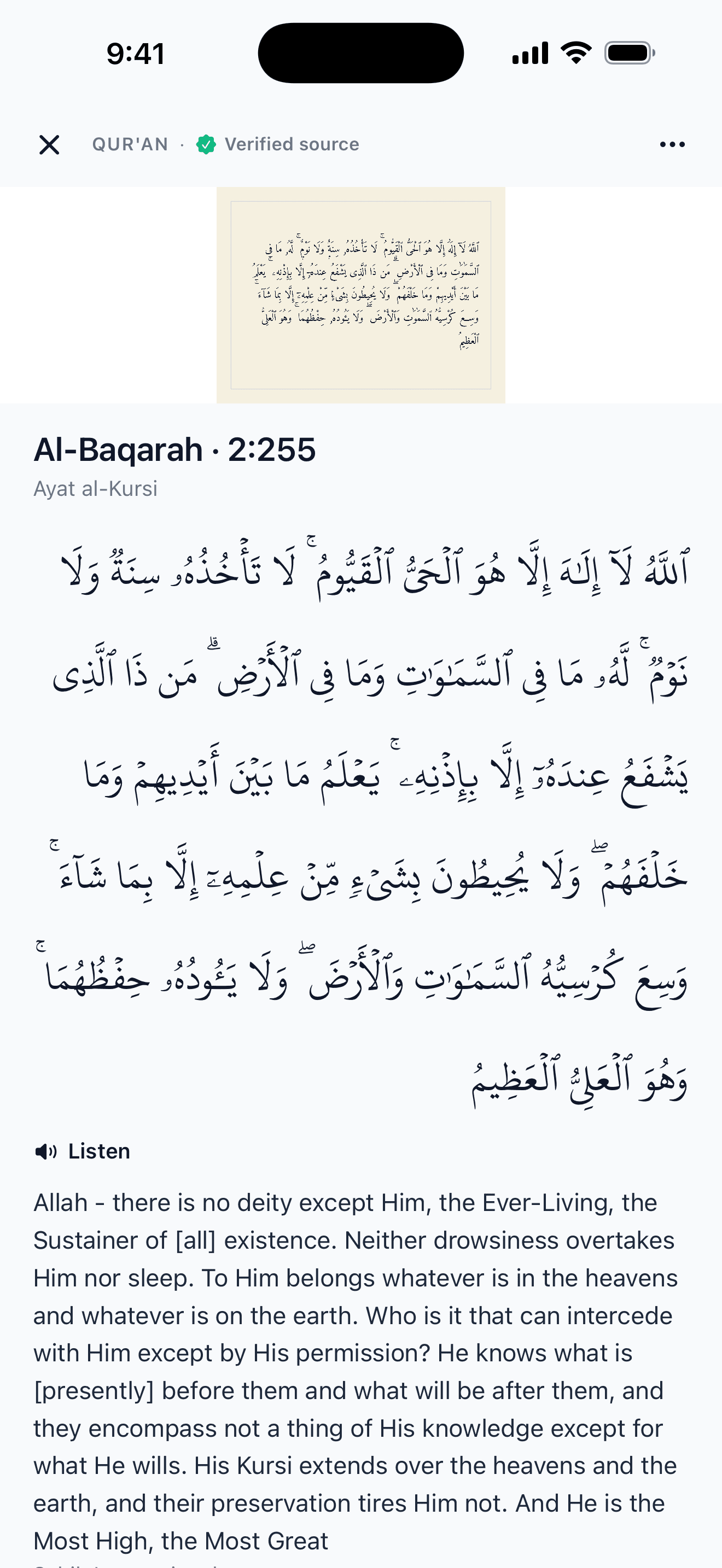
How it works
01
Open the scanner
Tap Smart Scanner from the home screen. The camera view opens immediately.
02
Point and hold
Hold the camera over the Arabic text. RecitID auto-detects the text region and sends it for OCR.
03
Tap the match
The matching verse is returned. Tap it to open the full verse.
What Smart Scanner handles
- Printed Mushafs, including standard Madinah prints and Tajweed-coloured editions.
- Screens (phones, tablets, laptops) and photos saved to your device.
- Books, articles, posters, and most modern Arabic publishing fonts.
- Clear handwriting often works, useful for students working from notes.
- Quran matches show the full Arabic, translation, tafsir and audio, with a button to open the full surah in the reader and its 130+ playback reciters.
When to use Smart Scanner
Six everyday cases where scanning beats typing a search. Think of it as a reverse image search for a Quran ayah.
You saw an ayah on social media with no reference
Screenshot the post, open Smart Scanner and pick the saved image. You get the surah, the verse number and the translation, with no need to ask in group chats.
You're reading a printed Mushaf and want the translation
Point the camera at the Arabic, tap the match, and the ayah opens with your chosen translation. Useful if you're studying and your Mushaf has no translation alongside.
You saw a poster or flyer at the masjid
If an ayah appears on a Ramadan poster, a bookmark or a community announcement, scan it to find the source and read the context around it.
You're a student revising from notes
Copied an ayah into your notebook? If your handwriting is clear, scan it to find the verse and compare your copy with the Uthmani text.
You want to share an ayah you're looking at
Scan the printed ayah, open it in RecitID, and use the share poster feature to send a nicely formatted image to someone with the reference intact.
You're learning Arabic and want to see a line in context
Scan a line you're reading to see the full verse with its translation and tafsir, then hear the ayah recited.
Plans
FAQ
How does the Quran OCR scanner work?
Smart Scanner uses optical character recognition tuned for Arabic script. Point your camera at Arabic text and the app reads the characters, matches them against the Quran text and labels how sure it is (Verified source, Possible match, Could not verify source or Recognised text). The result shows the verse with translation, tafsir and audio.
What can it scan?
Printed Mushafs, phone and tablet screens, laptop displays, books, articles, posters, and social-media screenshots. Clear handwriting often works too, though it's harder than print.
Can I scan a surah page?
Yes. Point the Quran scanner at a full surah page in a printed Mushaf and RecitID names the surah and the ayah, then opens them with translation, tafsir and audio. It also recognises hadith and du'a cards and shows the verified source, or says clearly when a source can't be verified.
Can I scan handwritten Arabic?
Often, if it's clear. Smart Scanner is built for printed Arabic, so neat handwriting usually reads but fast or messy writing may not. If it misses, paste or type the Arabic instead and you still get the full result.
Can I scan a screenshot from Instagram, TikTok, or WhatsApp?
Yes. Save the image to your camera roll and open Smart Scanner. It reads saved photos as well as live camera input, which helps when an ayah is shared as a caption or graphic with no source reference.
Does it need internet?
Yes. Scanning uses cloud OCR for accuracy across different fonts, diacritics, and handwriting styles. A stable connection works best.
Is Smart Scanner on the free plan?
Yes. The free plan includes 3 scans a day. Monthly Pro raises that to 25 a day and Annual Pro to 35.
Does it work with Tajweed-coloured Mushafs?
Yes. Standard black-ink Mushafs, Tajweed-coloured editions (Madina, King Fahd Complex, and most published editions), and modern Arabic fonts used in Islamic publishing are all supported.
What happens after a match?
The ayah opens with the full Arabic text, translation in your preferred language (41 available), tafsir with its source named, AI notes marked as AI, the surrounding verses and audio of the ayah. From there you can open the full surah in the reader, where 130+ reciters are available for playback.
Is the OCR accurate on small text or low light?
Accuracy is highest on clean, well-lit text at comfortable reading distance. Low light, glare, or fingers covering part of the ayah will reduce matches. If nothing comes back, move closer and retake the photo in better light.
Try it
Download RecitID and scan any Mushaf you have with you.